For water tanker suppliers

The diary knows what you delivered. It can't tell you who hasn't paid.

Tankersathi keeps every order, every customer and every rupee outstanding on the phone already in your pocket. One number opens one business — and nobody else's.

Coming soon on Play Store Ask on WhatsApp

Android only. Sign in with your phone number and a 6-digit PIN — no SMS, no waiting for an OTP that never arrives.
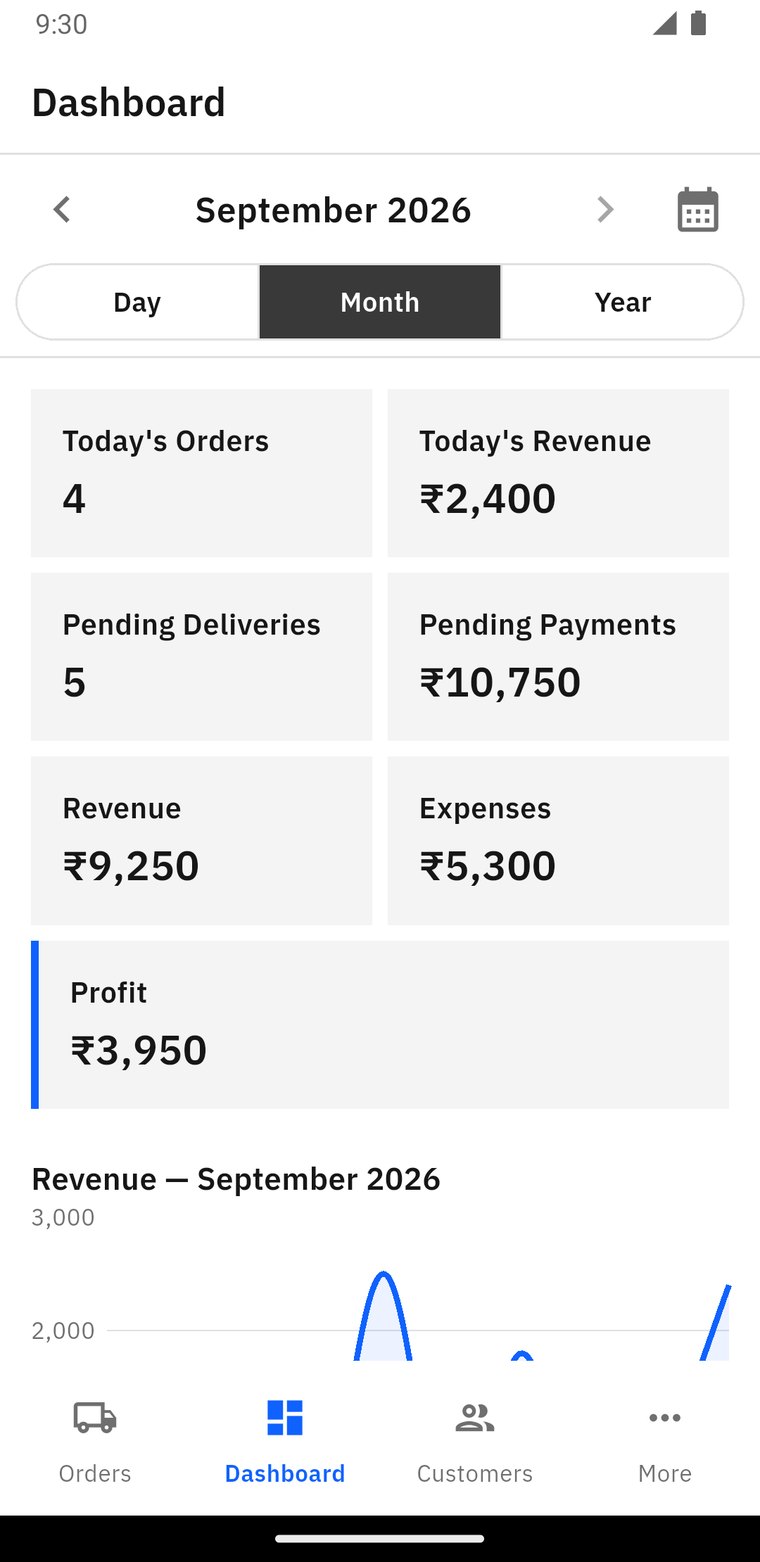
The Tankersathi dashboard for September 2026: today's orders, today's revenue, pending deliveries, pending payments, revenue, expenses and profit.

Three things a notebook will never do for you

01

Add up who owes you

Flip back four months and total it yourself, or open the app: every customer with a balance floats to the top of the list, biggest first, each one labelled ₹4,800 pending. One tap calls them.

02

Close the month

Revenue, expenses and profit for one day, one month or one whole year — pick the period and every number on the screen answers for that period, and nothing else.

03

Survive being left in the rain

A wet page, a lost book, a driver who took it home. Your records sit behind your phone number instead, and the app still shows them when the network is down.

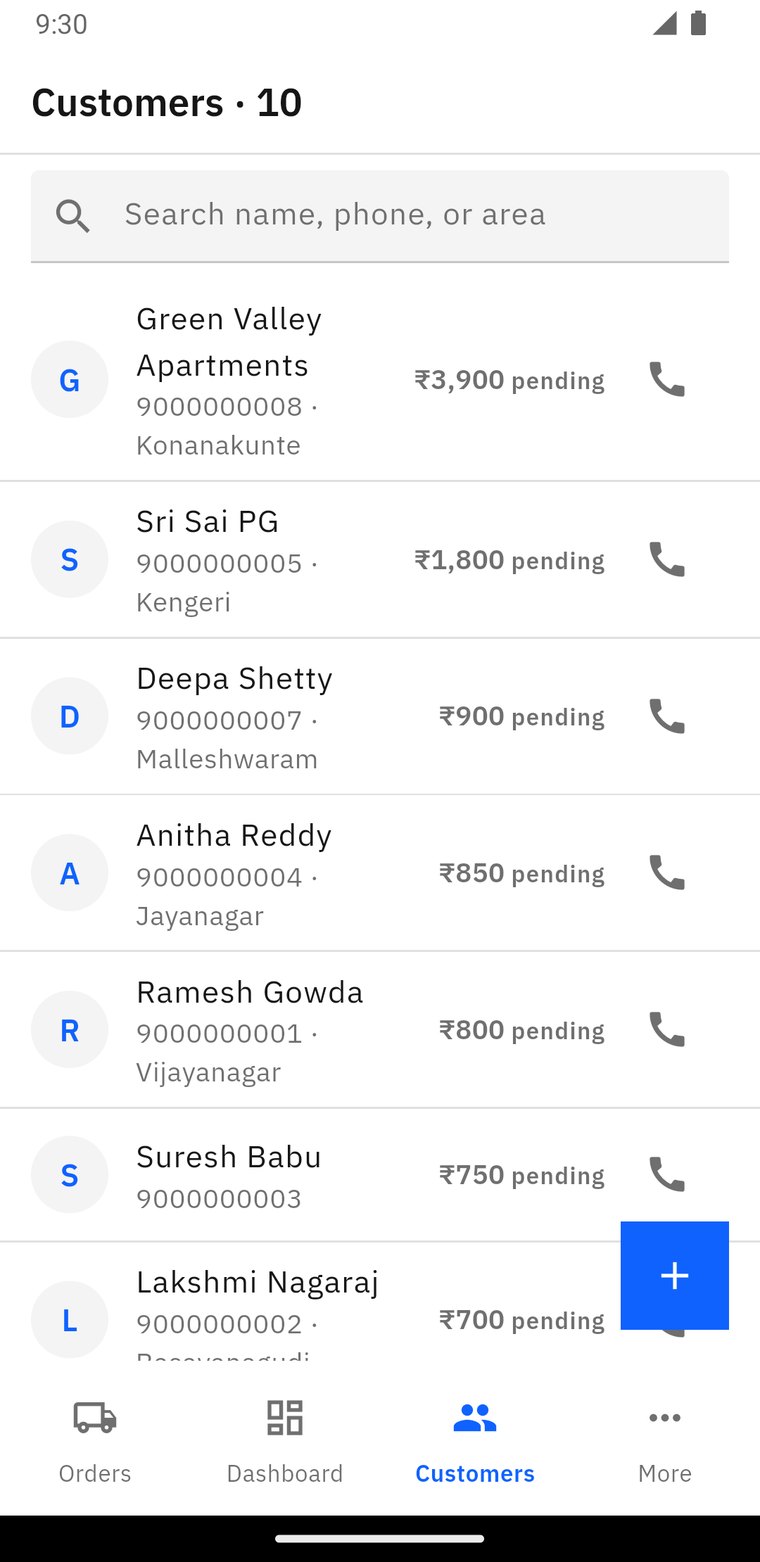
The customer list, everyone with a balance at the top: Green Valley Apartments ₹3,900 pending, Sri Sai PG ₹1,800 pending, and a call button on every row.
Know what you're owed

You don't go looking for the defaulters. They're already at the top.

Anyone with an outstanding balance sits above everyone else, biggest amount first, with the figure written next to their name. The call button is on the row — no digging for the number.

Open a customer and you get their whole history: total orders, what they've paid, what they haven't, when you last delivered — plus Call, WhatsApp and Navigate.

One period at a time — and you pick it

Most apps mix today, this month and all-time on one screen, which is exactly why the numbers stop being trustworthy. Here the heading says what you're looking at, and everything under it obeys.

14 Feb 2026 DAY
Orders9
Revenue₹10,800
Still unpaid₹2,400
February 2026 MONTH
Orders168
Revenue₹2,01,600
Still unpaid₹19,200
2026 YEAR
Orders1,342
Revenue₹16,10,400
Still unpaid₹48,600
One call, one tap

Ramesh calls. You talk for forty seconds. The order is already written.

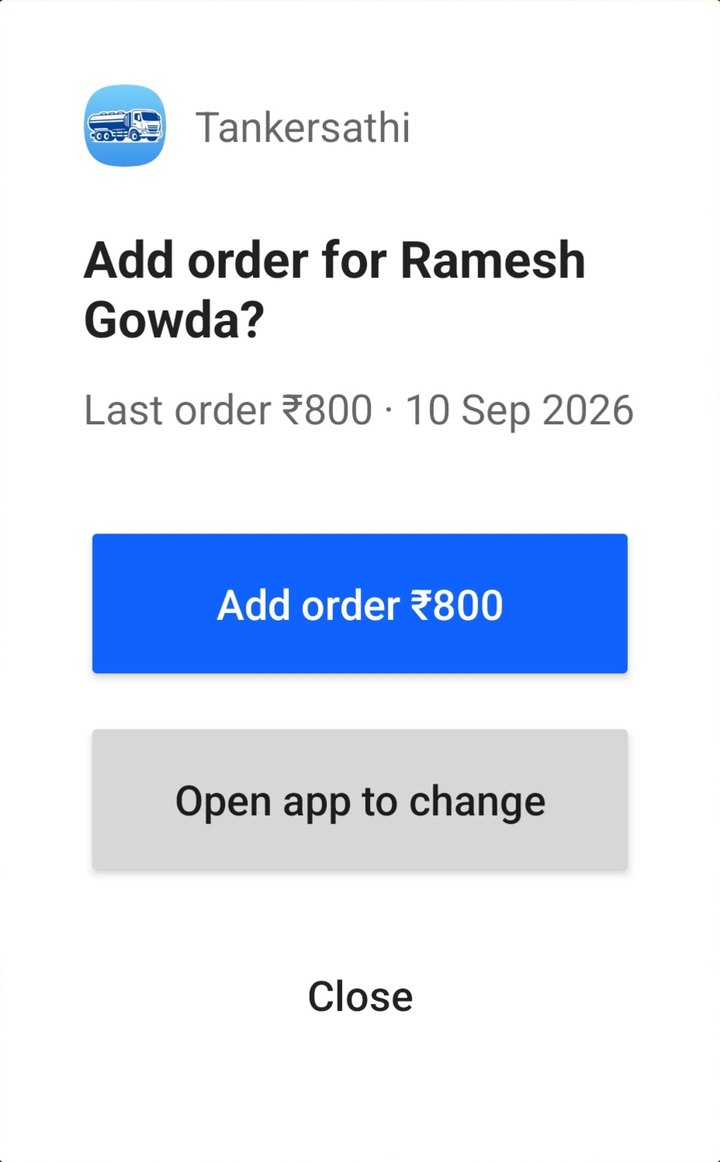
The second the call ends, Tankersathi shows you his name and what he ordered last time. One tap and it's saved — no app to open, no form to fill, no unlocking the phone.

Regulars order in three words and hang up. By the time you've parked, filled the tanker and remembered, half of them are gone. So the app asks you right then.

Android 12 and above. Turn it on if you want it — the app works fine without it.

The prompt that appears when the call ends: Add order for Ramesh Gowda? Last order ₹800 on 10 Sep 2026, with an Add order ₹800 button.

He rings you

The app recognises the number against your own customer list, on your phone. Nothing is sent anywhere and no call log is opened.

You hang up

Under a second later the prompt is on the screen with his name on it — over the lock screen, with the app's own chime, even if the call lasted four seconds.

One tap. Saved.

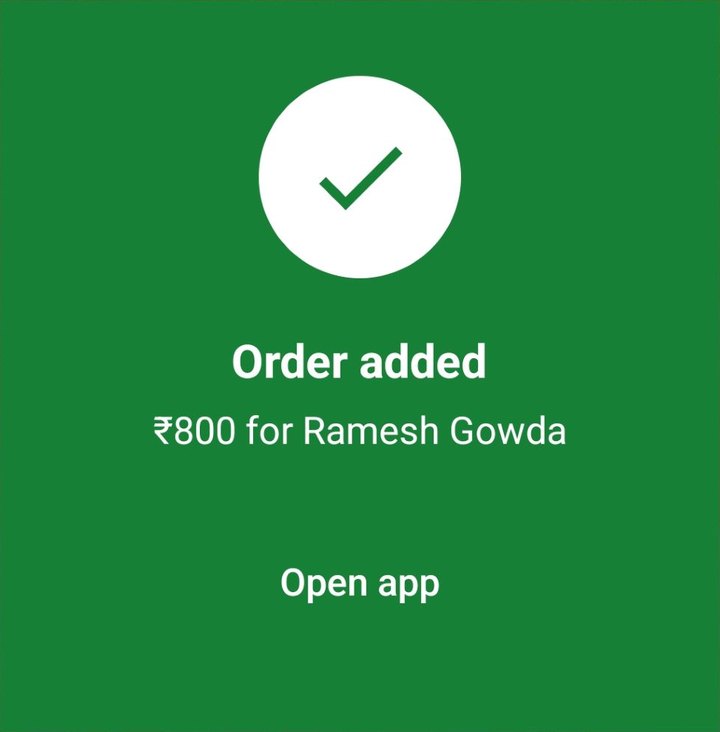
Same amount, same address, dated today, marked unpaid. The prompt turns green and closes itself. Different this time? Open the form instead.

The prompt after tapping: a green card reading Order added, ₹800 for Ramesh Gowda.
That's the whole interaction — it closes itself a second later.
Booking link & QR sticker

And for the calls you'd rather not take at all

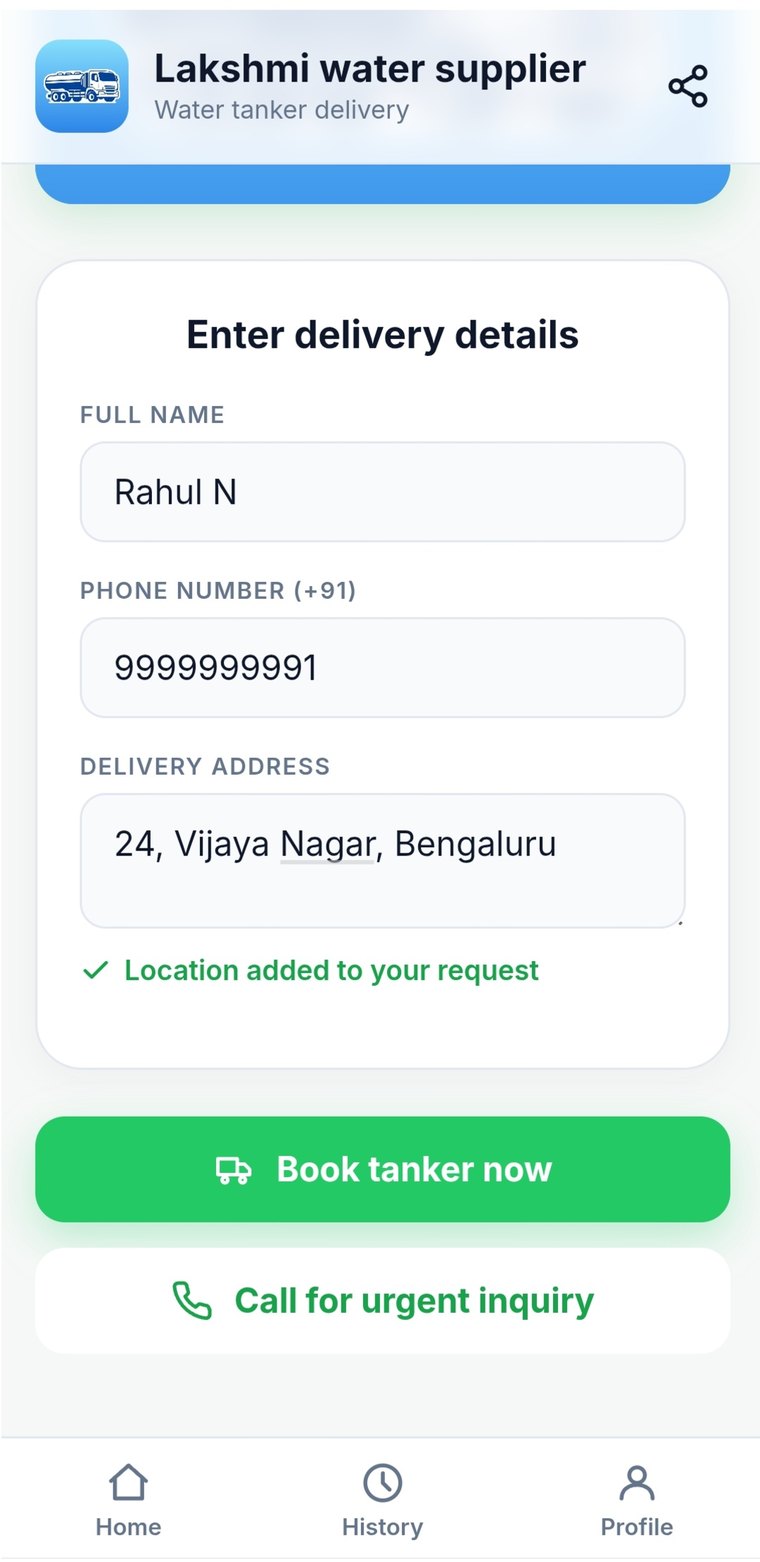
Print the sticker and put it on the back of the tanker. Anyone who sees it scans the code, fills their name, phone and address, and taps Book tanker.

The request lands in your inbox with a chime. You set the price and confirm — that's when it becomes a real order. The same link works on WhatsApp, so you can send it to a new apartment block instead of explaining the rate twice.

book.tankersathi.com/your-name — permanent, and it can't be taken from you
The printable sticker the app generates: a QR code above the words Scan to order and the business's booking address.
The app draws it. Any print shop can make it — laminated, 20 cm across.
The booking page a customer sees after scanning the code: name, phone number and delivery address, with a Book tanker now button.
What they fill in after scanning. No app to install.

The rest of it is the boring, useful part

Today's trips, in order of urgency

Overdue first, then today, then the rest. Mark delivered, record a payment or undo a mistake from the row itself.

Customers from your phone book

Tick the contacts you already deliver to and import them in one go. Anyone already added is greyed out, so you can't double them up.

Expenses with the receipt attached

Fuel, salary, maintenance, repair, office, miscellaneous — with a photo of the slip, kept where only you can open it.

Works where the signal doesn't

A red strip says you're offline and the last saved orders, customers and dues stay on the screen.

And three things it will not do

Worth knowing before you install anything that sits next to your business.

It never reads your call history

The app doesn't ask for call-log permission and never will. Android hands it the ringing number, it checks that number against your customer list on the phone, and that's the end of it — nothing leaves the device. You can also tell it to stay quiet for anyone who isn't your customer.

It never shows your customers to another supplier

Your business is fenced off in the database itself, not just in the screens. Another supplier signing in sees nothing of yours — there is no query that would return it.

It doesn't pretend to be more than one phone

Android only today, one business per number, and a forgotten PIN is reset by a person on WhatsApp rather than a form. Small, but honest about it.

Running by this evening

STEP 01

Your number, your PIN

Type your phone number, choose six digits, type them twice, then name your business. That's the sign-up.

STEP 02

Bring your customers across

Import them from your phone book in one pass. Names and numbers are enough to start.

STEP 03

Write tomorrow's trips in it

Keep the diary beside you for a week if you like. You'll stop reaching for it.

Put the diary down.

Your number, a six-digit PIN, and your customers imported from your phone book. About five minutes.

Coming soon on Play Store Ask on WhatsApp

Not on the Play Store yet — message us on WhatsApp and we'll get you started.